Showing posts with label yahoo messenger. Show all posts

Wednesday, June 24

Disable Yahoo! Messenger Buzz

Buzz feature lets you get a friend's attention through their instant messaging window. When you buzz someone:

1. You send a short message for them: BUZZ!
2. The message has a not-so-quiet-but-not-so-loud doorbell sound.
3. You shake their IM window. Feels like an earthquake.
4. Sometimes, its kind of ANNOYING!

So you hate the Yahoo! Messenger Buzz feature? Here's a little trick so you can remove and disable this feature:

1. On YM window, click Messenger then Preferences
2. On the left side, click Alerts and Sounds, then click on the third row on the right which says: "A messenger contact buzzes me"
3. Uncheck the boxes for "Shaking the message window" and "Playing sound"

Cheers! No more annoying alerts when a contact BUZZes! you.

If you like this post, you may want to subscribe to the Kebism - The Personal Blog of Kevin Michael C. Garcia RSS feed. You can also subscribe by e-mail and have new articles directly sent to your inbox. Thank you!
Tuesday, May 19

Ignore Annoying People on Yahoo Messenger (Even on Your Buddy List!)

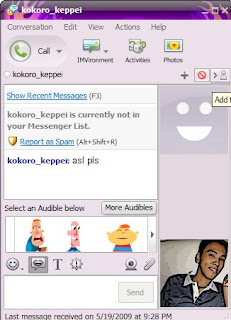
How do you ignore "annoying" people on Yahoo! Messenger? It's simple! First on our Ignore 101: "unknown people." Have you experienced people who tried to ask your ASL for 7x? That's really annoying, isn't it? So here we go. On the chat box, just point to the icon beside the "add to buddy list" sign (+) and click it. It's the instant button for "ignore."

How about people on your list who love to play annoying tricks on you, "buzz-ing" you all the time and keeps on asking you for a date (*lol)? Now here's the thing:


1. On your Yahoo! Messenger, click "Messenger" 
2. Then, "Preferences."
3. You must find the list on the left side and click "Ignore List."
4. Click "Ignore only the people below."
5. Then click "add."
6. Type the username of the person you want to ignore, and hit enter.
7.  Click "OK" and say sayonara!

ksm^x

If you like this post, you may want to subscribe to the Kebism - The Personal Blog of Kevin Michael C. Garcia RSS feed.  You can also subscribe by e-mail and have new articles directly sent to your inbox. Thank you!

Sunday, May 17

Know Who's Invisible on Yahoo Messenger

A good trick to identify your friends if they are on invisible mode:
1. Double click their name on your list to open a chat window.
2. Click IMVironment --> See all IMVironments --> Interactive Fun
3. Choose Doodle
4. If it says "waiting for your buddy to load Doodle," then your friend is really offline.

5. But if it shows a blank screen like the image below, then your friend is in "invisible mode!"


6. Another way to check invisible users in YM is to use Y!Detector. Simply enter your friend's username and it will automatically check if the user is online, offline, or invisible.

Happy haunting!

ksm &-&

If you like this post, you may want to subscribe to the Kebism - The Personal Blog of Kevin Michael C. Garcia RSS feed.  You can also subscribe by e-mail and have new articles directly sent to your inbox. Thank you!

Monday, January 26

2 Yahoo! Messenger accounts in one PC


Ever wondered how to open two YM accounts simultaneously in one PC? Now here's whatcha need to do:

1. Click start / vista users: windows key.
2. Click run  / vista users: click on the space provided for the searchbox.
3. Type: regedit, press enter.
4. The registry editor will now appear. Double click on "HKEY_CURRENT_USER."
5. Double click on "software" --> then "Yahoo", then --> "pager" and lastly, --> "test."
6. Right click anywhere on the background, then point "new."
7. Click "DWORD 32 Bit Value."
8. Rename it "plural."
9. Double click "plural," then change 0 to 1.
10. Finally, you can open 2 Yahoo Messengers in one PC, at the same time!

ksm~


If you like this post, you may want to subscribe to the Kebism - The Personal Blog of Kevin Michael C. Garcia RSS feed.  You can also subscribe by e-mail and have new articles directly sent to your inbox. Thank you!

Earn Online Thru PTC

Earning online is very easy. I've already tried this method, and it really works! It's safe, user-friendly and virus-free! It's what we call "PTC"  or Paid To Click program. It's the online method, where members view/click advertisements for a short period of time (usually 30 seconds)...Read More!